Crypto Casino Deposit Not Credited in Canada: Check TXID First
Last updated: August 22, 2026
Do not send the same deposit again. Find the full transaction ID first, then determine whether the transfer is still with the sender, pending on the blockchain, or fully confirmed but waiting for casino crediting.
If there is no TXID, start with the wallet or exchange that sent the funds. If the TXID is pending, the casino normally cannot credit the transfer yet. If the transaction is fully confirmed and the address, network, token, amount and memo all match the casino deposit route, stop waiting on the blockchain and send the evidence to the casino payment team.
30-Second Diagnosis: Where Did the Deposit Stop?
| What You See | What It Usually Means | Who Acts Next |
|---|---|---|
| No TXID / transaction hash | The sender has not provided an identifiable on-chain transfer. | Wallet or exchange. |
| TXID is pending or unconfirmed | The transfer exists but has not reached finality. | Blockchain / sender-side fee handling. |
| Confirmed, but below casino threshold | The transaction is valid but the receiving policy still needs more confirmations. | Wait for the required confirmations. |
| Fully confirmed + correct route | The blockchain stage is complete; the balance still needs casino/payment-processor crediting. | Casino support / payment team. |
| Failed or reverted | The intended transfer did not complete. | Check the sending wallet and returned balance. |
| Wrong network / wrong chain | This is a route-recovery case, not a normal pending deposit. | Use the wrong-network deposit recovery guide. |
| Amount below minimum | The transfer may not auto-credit even if it reached the address. | Check crypto casino minimum deposit rules and ask support before topping up. |
The most important distinction is confirmed versus credited. A block explorer proves what happened on-chain. It does not prove that the casino has matched that transaction to your account balance. Once the transfer is fully confirmed and every route detail matches, the useful action shifts from “wait for the blockchain” to “give the casino a complete transaction record.”
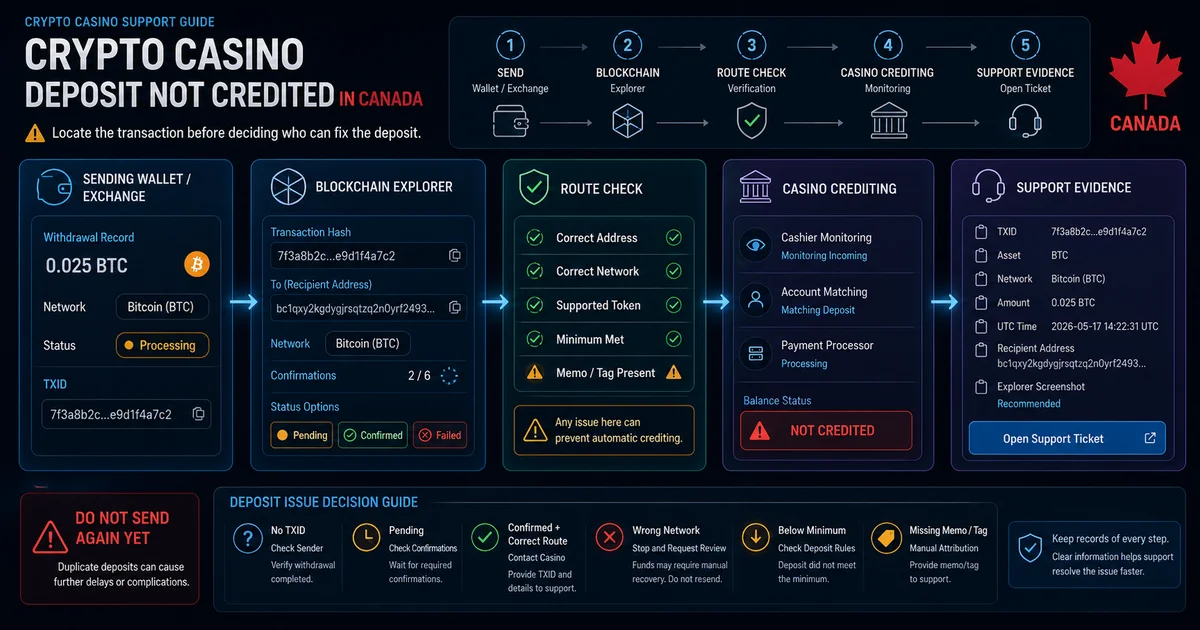
TXID Check: Is the Transfer Actually On-Chain?
No TXID is a sender-side problem
Open the sending wallet or exchange withdrawal history and look for TXID, TxHash, transaction hash or a link to a blockchain explorer. An exchange order number or internal withdrawal reference is not necessarily the on-chain transaction ID.
An exchange can show “completed” after its own withdrawal process finishes. That still does not tell you whether the casino has received a confirmed blockchain transaction. If the sender cannot provide a usable TXID, ask whether the transfer was actually broadcast and which network was used.
Check the TXID on the matching blockchain
Once the hash exists, open it on the explorer for the network that was actually used. Check the status, confirmation count, recipient address, exact asset or token, amount received and timestamp. For multi-network assets such as USDT, also confirm the chain and token route: ERC20, TRC20 and BEP20 are not interchangeable deposit instructions.
A pending transaction may simply need more blocks. Confirmation thresholds vary by casino and coin: for example, Wild.io currently publishes different requirements for BTC, ETH, LTC, TRX, USDT networks and other supported assets. The key rule is not to assume that the first “successful” block-explorer status equals the casino’s required finality.
Once the required confirmations are complete, stop treating it as a blockchain delay. If the casino balance is still empty, move to the six-field check below.
A useful way to think about the evidence is that broadcast, confirmed and credited are three different states. Broadcast means the sender created a network transaction. Confirmed means the blockchain accepted it deeply enough for the receiving service’s policy. Credited means the casino’s payment system recognized that transfer and assigned the value to your account. The first two can be proved independently with the TXID; the third is an internal casino/payment-processor action.
Confirmed but Not Credited: Check These Six Fields
- Recipient address. Compare the complete address in the explorer with the deposit address shown in the casino cashier. A visually similar or previously used address is not enough.
- Network. The network used by the sender must match the route selected in the casino. If it does not, stop here and use the wrong-network recovery guide.
- Exact asset or token. A supported blockchain does not mean every token contract on that chain is accepted. Check the exact asset, not just a familiar ticker.
- Amount received. Compare the amount that reached the casino address after sender-side fees with the current minimum. BitStarz, BetFury and Wild.io all currently publish warnings that sub-minimum crypto deposits may fail to credit normally.
- Memo, destination tag or payment ID. Shared-address systems can receive the funds on-chain but fail to assign them to the correct casino account if the required identifier is missing. BetFury currently documents memo/tag requirements for assets including XRP, XLM, TON and NOT.
- Current cashier route. Wallet maintenance, a disabled payment route, an old deposit address or payment-processor synchronization can delay a transaction that otherwise looks correct.
If all six checks pass and the casino’s required confirmation count has been reached, the problem is no longer “where is the blockchain transaction?” The next useful question is whether the casino can see the TXID in its payment system and whether the transfer needs manual attribution or manual crediting.
Who Needs to Act Now?
Sender or Exchange
Use this route when there is no TXID, the withdrawal remains internal to the sender, or the sender says “completed” but cannot supply an on-chain record. Ask for the full TXID, network and exact amount broadcast.
Blockchain / Confirmation Stage
Use this route when the TXID exists but remains pending or below the receiving threshold. Monitor the explorer. Use acceleration or fee replacement only when the sending wallet explicitly supports it for that transaction.
Casino or Payment Processor
Use this route when the transfer is fully confirmed and the recipient, network, asset, amount and memo all match. At that point, send one complete evidence packet instead of opening several partial chats.
A missing deposit is different from a pending withdrawal. If money is leaving the casino rather than entering it, use the crypto casino withdrawal problems guide.
Send One Complete Support Packet
Support can investigate a confirmed transfer faster when the first message contains everything needed to locate it. Save:
- Casino account email or username
- Cryptocurrency or token
- Network used
- Exact amount
- Full TXID / transaction hash
- Sending address, if visible
- Casino deposit address
- UTC date and time
- Current confirmation count
- Explorer screenshot or public transaction page
- Casino cashier screenshot
- Sending wallet/exchange withdrawal screenshot
Support message
My crypto deposit is fully confirmed on-chain but has not appeared in my casino balance.
Account: [email or username]
Asset: [coin/token]
Network: [network]
Amount: [exact amount]
TXID: [full transaction hash]
Receiving address: [casino deposit address]
UTC time: [date/time]
Confirmations: [current count]
The recipient, network, asset and amount match the deposit route shown in my account. Please check account attribution, payment-processor status or manual crediting and provide the ticket reference.
If support only says “wait”
Ask four specific questions: Has the transaction reached your required confirmation count? Can the payment team see this TXID? Is manual attribution or manual crediting pending? What is the written ticket or case number? Keep the replies and screenshots in one timeline instead of restarting the case with new chats.
BetFury’s current help centre illustrates the distinction clearly: when a correctly sent deposit still fails to auto-credit, support can review the TXID, cryptocurrency and network and pass a valid case for manual crediting. That is the type of escalation you want once the blockchain evidence is complete.
Do Not Make the Deposit Problem Worse
While the current case is open, do not send the same payment again just to “test” the account. Do not send a second verification deposit, do not pay an unsolicited recovery fee, and never share a seed phrase, private key, wallet backup or remote-access code. A public TXID can help support trace a transaction; it does not require giving anyone control of your wallet.
Before the next deposit, reopen the casino cashier instead of reusing an old screenshot or address. Match the exact asset and network, include a memo/tag when required, and make sure the amount that will actually arrive remains above the displayed minimum after sender-side deductions. Save the cashier screen and the TXID until the balance has credited.
If you are using USDT, remember that the same ticker can be offered on several chains. Keep the broader network-choice comparison on the USDT casinos Canada page; this guide only diagnoses a transfer that has already been sent.
After the Deposit Is Resolved
Keep the TXID, cashier screenshot and support case reference until the credit, return or other resolution is complete. If the diagnosis points to a wrong network, a below-minimum transfer or a withdrawal problem instead, use the dedicated owner pages linked above rather than restarting the same support case.
If your intent has changed from fixing an existing transfer to comparing different casinos, use our current crypto casino ranking for Canada. This troubleshooting page does not rank casinos or send readers to casino cashiers.